Hello,
Recently my Arduino UNO stopped to be recognized by computer (using USB), I tried a few stuffs:
– Changed the Atmega328
– Rewrite bootloader
– Tested the controller on other board
– Measure the connection between a few pins using a multimeter
Nothing worked, so I decided to try to update the atmega8u2 firmware that is responsible to control de USB connection, I found two articles that I used as base:
Updating the Atmega8U2 on an Uno or Mega2560 using DFU e também How to upgrade atmega8u2 firmware
Both of them used solutions that needs to soldering a resistor on the board, but I don’t want to solder anything to the board, so I checked next to the atmega8u2 exists the ICSP pins, so I decided to try to burn the bootloader using them. Just to prevent other disaster I removed my atmega328 from board and connected the USB ASP to the ICSP pins. (Remember that the PIN 1 has a number or a little mark near it, mine had a small white circle)
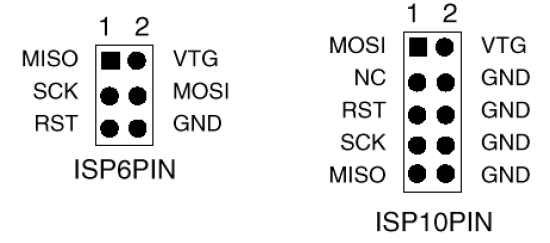
After that, I accessed the dir that contains atmega8u2 hex of Arduino Uno (/arduino/hardware/arduino/firmware), and then I tried to rewrite the bootloader:
sudo avrdude -c usbasp -p m8 -u -U flash:w:UNO-dfu_and_usbserial_combined.hex
It didn’t worked because it is a atmega8u2 and I was trying to write it with atmega8 the error was:
avrdude: Yikes! Invalid device signature.
So I did a little more research and I discover that at90usb162 is almost the same, so I decided to take a shot with force (-F) option
sudo avrdude -c usbasp -p usb162 -u -U flash:w:UNO-dfu_and_usbserial_combined.hex -F
I waited it to burn, turn arduino uno off, connected my atmega328 and then turn it on and my USB just showed up on my computer, so now I can program my Arduino UNO using USB again.
Matheus
PS: Right after the booloader update I tried to Upload a Sketch to atmega328 without sucess, it was out of sync, so I tried to rewrite the bootloader of atmega328, and then everything started to work.
References:
http://8515.avrfreaks.net/index.php?name=PNphpBB2&file=viewtopic&p=688637
http://image.pinout.net/pinout_10_pin_files/connector_pinout.php?image=avr_icsp.png&pinout=%20This%20a%20pinout%20of%20the%20AVR%20ICSP%20header.%20(6-pin%20&%2010-pin)
https://mqhqxisngl.wordpress.com
https://mqhqxisngl.wordpress.com
https://vrxuhoyhpk.wordpress.com
https://jdutyrirge.wordpress.com
https://jdutyrirge.wordpress.com
https://apfkycjgfb.wordpress.com
https://apfkycjgfb.wordpress.com
https://ficcpnhwqv.wordpress.com
https://bbfiuetlig.wordpress.com
https://bbfiuetlig.wordpress.com
https://bbfiuetlig.wordpress.com
https://hbclmjyygw.wordpress.com
https://tdxxfrobpl.wordpress.com
https://haaitoytgz.wordpress.com
https://haaitoytgz.wordpress.com
https://haaitoytgz.wordpress.com
https://pufffrrowy.wordpress.com
https://omvrwwxyfa.wordpress.com
https://omvrwwxyfa.wordpress.com
https://omvrwwxyfa.wordpress.com
https://omvrwwxyfa.wordpress.com
https://ddvjfrjvdf.wordpress.com
https://ddvjfrjvdf.wordpress.com
vavada online casino [url=https://daostone.ru/]vavada online casino[/url] .