Hello,
Recently my Arduino UNO stopped to be recognized by computer (using USB), I tried a few stuffs:
– Changed the Atmega328
– Rewrite bootloader
– Tested the controller on other board
– Measure the connection between a few pins using a multimeter
Nothing worked, so I decided to try to update the atmega8u2 firmware that is responsible to control de USB connection, I found two articles that I used as base:
Updating the Atmega8U2 on an Uno or Mega2560 using DFU e também How to upgrade atmega8u2 firmware
Both of them used solutions that needs to soldering a resistor on the board, but I don’t want to solder anything to the board, so I checked next to the atmega8u2 exists the ICSP pins, so I decided to try to burn the bootloader using them. Just to prevent other disaster I removed my atmega328 from board and connected the USB ASP to the ICSP pins. (Remember that the PIN 1 has a number or a little mark near it, mine had a small white circle)
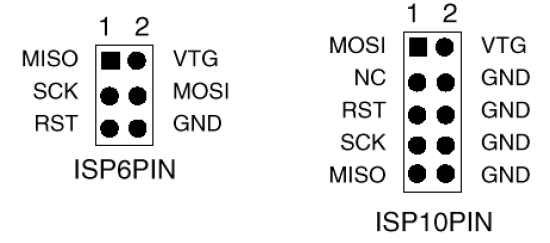
After that, I accessed the dir that contains atmega8u2 hex of Arduino Uno (/arduino/hardware/arduino/firmware), and then I tried to rewrite the bootloader:
sudo avrdude -c usbasp -p m8 -u -U flash:w:UNO-dfu_and_usbserial_combined.hex
It didn’t worked because it is a atmega8u2 and I was trying to write it with atmega8 the error was:
avrdude: Yikes! Invalid device signature.
So I did a little more research and I discover that at90usb162 is almost the same, so I decided to take a shot with force (-F) option
sudo avrdude -c usbasp -p usb162 -u -U flash:w:UNO-dfu_and_usbserial_combined.hex -F
I waited it to burn, turn arduino uno off, connected my atmega328 and then turn it on and my USB just showed up on my computer, so now I can program my Arduino UNO using USB again.
Matheus
PS: Right after the booloader update I tried to Upload a Sketch to atmega328 without sucess, it was out of sync, so I tried to rewrite the bootloader of atmega328, and then everything started to work.
References:
http://8515.avrfreaks.net/index.php?name=PNphpBB2&file=viewtopic&p=688637
http://image.pinout.net/pinout_10_pin_files/connector_pinout.php?image=avr_icsp.png&pinout=%20This%20a%20pinout%20of%20the%20AVR%20ICSP%20header.%20(6-pin%20&%2010-pin)
No Arduino qual a diferença entre o bootloader e o firmware?
mostbet kg [url=http://mostbet12034.ru]http://mostbet12034.ru[/url]
mostbet.com [url=mostbet12033.ru]mostbet12033.ru[/url]
mostbet kg [url=https://mostbet12035.ru/]https://mostbet12035.ru/[/url]
mostbet kg [url=https://mostbet12036.ru/]mostbet kg[/url]
mostbet скачат [url=https://mostbet12037.ru/]https://mostbet12037.ru/[/url]
бк мостбет [url=http://mostbet12039.ru]http://mostbet12039.ru[/url]
mostbet ckachat [url=https://www.mostbet12038.ru]mostbet ckachat[/url]
mostbet kg [url=http://mostbet12040.ru/]mostbet kg[/url]
Really insightful post — Your article is very clearly written, i enjoyed reading it, can i ask you a question? you can also checkout this newbies in classied. iswap24.com. thank you
1win букмекерская контора официальный сайт зеркало [url=http://1win5521.ru]http://1win5521.ru[/url]
1вин вход в личный кабинет [url=http://1win5520.ru]1вин вход в личный кабинет[/url]
flight game money [url=http://www.aviator-game-predict.com]http://www.aviator-game-predict.com[/url] .
I was suggested this web site by my cousin Im not sure whether this post is written by him as no one else know such detailed about my trouble You are incredible Thanks
скачать официальный сайт мелбет [url=https://melbet5003.ru]https://melbet5003.ru[/url]
melbet apps [url=https://www.melbet5002.ru]melbet apps[/url]
melbet .md [url=melbet5012.ru]melbet .md[/url]
promocode melbet [url=https://www.melbet5011.ru]https://www.melbet5011.ru[/url]
melbet probleme de logare [url=https://www.melbet5014.ru]melbet probleme de logare[/url]
melbet купон [url=https://melbet5005.ru/]melbet купон[/url]
1win xyz [url=https://1win12020.ru]1win xyz[/url]
пароль для мелбет [url=melbet5004.ru]melbet5004.ru[/url]
melbet зеркало 2020 [url=https://melbet5009.ru]https://melbet5009.ru[/url]
Just checking out umcassino and thought I’d share the love. It’s really solid with a user-friendly interface. Give it a whirl, you won’t regret it! You can find it here: umcassino
пин ап ставки на виртуальный спорт [url=https://pinup5014.ru/]https://pinup5014.ru/[/url]
Yo, check out 23win8bet. It has been solid to me. Plus all the games make you feel like you got to be on 23win8bet
1win русский [url=www.1win5522.ru]www.1win5522.ru[/url]
1вин покер [url=1win5512.ru]1win5512.ru[/url]
1win aviator yuklab olish [url=https://www.1win5514.ru]https://www.1win5514.ru[/url]
Really insightful post — Your article is very clearly written, i enjoyed reading it, can i ask you a question? you can also checkout this newbies in seo
Do you have a spam problem on this site; I also am a blogger, and I was wondering your situation; we have created some nice methods and we are looking to swap
techniques with others, please shoot me an e-mail if interested.
I like the valuable info you provide in your articles. I’ll
bookmark your weblog and check again here
regularly. I am quite certain I’ll learn many new stuff right here!
Best of luck for the next!
Really great read — I appreciate how clearly you explained the importance of local online presence for businesses today. It’s a topic many companies overlook, i find it very interesting and very important topic. can i ask you a question? also we are recently checking out this newbies in the webdesign industry., you can take a look . waiting to ask my question if allowed. Thank you
Hello, this weekend is good for me, because this
time i am reading this fantastic educational post
here at my residence.
как зайти на сайт мостбет [url=https://mostbet2029.help]https://mostbet2029.help[/url]
Instagram Chat Assistant – $250 a Day. Several online retailers are looking to hire additional Instagram Chat Assistants to help drive more sales through Direct Messages sent to their Instagram accounts. This is online work that can be done from anywhere, full training is provided and the pay is $250 a day. Hiring workers from all countries. Read full details here to complete your application if you are interested. You can find more info here: http://chat-assistant.advertising4you.co.uk
мостеб [url=http://mostbet2031.help/]http://mostbet2031.help/[/url]
1win yangi domen [url=https://MAQOLALAR.UZ/]https://MAQOLALAR.UZ/[/url]
I went over this website and I believe you have a lot of superb info, saved to fav (:.
1win uganda [url=https://1win5741.help/]https://1win5741.help/[/url]
Everything said made a lot of sense. But,
consider this, suppose you added a little content? I ain’t suggesting your information isn’t solid, however what if you added a post title to possibly
get people’s attention? I mean Programming atmega8u2 on Arduino Uno using USB Asp – Matheus Bratfisch is kinda vanilla.
You might peek at Yahoo’s front page and watch how they create article titles to grab viewers to
click. You might add a video or a related pic or two to grab readers excited about everything’ve written.
Just my opinion, it could make your blog a little bit more interesting.
Good day! I know this is kinda off topic however , I’d figured I’d
ask. Would you be interested in exchanging links or maybe guest writing a blog article or vice-versa?
My website covers a lot of the same subjects as yours and I believe we could greatly benefit from each other.
If you happen to be interested feel free to shoot me an e-mail.
I look forward to hearing from you! Awesome blog by
the way!
Write more, thats all I have to say. Literally,
it seems as though you relied on the video to make your point.
You definitely know what youre talking about, why waste your intelligence on just posting videos to
your blog when you could be giving us something enlightening to read?
1win az hesabı necə açmaq [url=http://1win5760.help/]http://1win5760.help/[/url]
Greetings! Very helpful advice within this article! It’s the little changes which will make the greatest changes.
Many thanks for sharing!
i enjoy reading this great article, i have shared it many times on my website and started following you, Do you post more often ?? i am the owner of https://webdesignagenturbayreuth.de/ a webdesign agency in bayreuth Germany, webdesign agentur bayreuth, you can link up if you are interested. Thank you
Greetings! I’ve been reading your website for some time now and finally got the bravery to go ahead and give you a shout out from Kingwood Texas! Just wanted to tell you keep up the great job!
wow i really enjoy reading this, do you post often ? i will check back for more update, you can also check me out at https://webdesignagentur.de.com/ one of the top Marketing Directory site in Germany
Greetings I am so grateful I found your webpage, I really found you by error, while
I was searching on Yahoo for something else, Regardless I am here now and would just
like to say thanks for a marvelous post and a
all round enjoyable blog (I also love the theme/design), I don’t have time
to look over it all at the moment but I have
bookmarked it and also included your RSS feeds, so
when I have time I will be back to read much more, Please do keep up the awesome work.
— выбирайте casino kometa, где всё работает чётко и честно: [url=https://gaz-truck.ru/]kometa casino[/url]