Hello,
I was reading my feeds and saw that Firefox 4.0 Beta was available. I verified what happened and I discovered that Mozilla Foundation transformed the version 3.7pre6a in 4.0b1.
I used it and didn’t notice any big improvement. Here a screenshot from it.
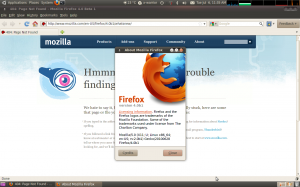
So how to use it?
Firefox 4.0 beta – Linux 32 Bits
Firefox 4.0 beta – Linux 64 Bits
Firefox 4.0 beta – others
After the download, close your firefox. Extract. Execute the file firefox. If you want to keep using it, you can create a shortcut to it.
Matheus
Greetings from California! I’m bored to death at work so I decided to check out your blog on my iphone during lunch break. I love the info you provide here and can’t wait to take a look when I get home. I’m shocked at how fast your blog loaded on my mobile .. I’m not even using WIFI, just 3G .. Anyhow, superb blog!
Can I just say what a comfort to uncover an individual who genuinely understands what they’re talking about on the net. You certainly understand how to bring a problem to light and make it important. More and more people really need to read this and understand this side of your story. It’s surprising you are not more popular given that you certainly have the gift.
Hey I know this is off topic but I was wondering if you knew of any widgets I could add to my blog that automatically tweet my newest twitter updates. I’ve been looking for a plug-in like this for quite some time and was hoping maybe you would have some experience with something like this. Please let me know if you run into anything. I truly enjoy reading your blog and I look forward to your new updates.
Currently it seems like Movable Type is the top blogging platform out there right now. (from what I’ve read) Is that what you’re using on your blog?
Right now it seems like WordPress is the best blogging platform out there right now. (from what I’ve read) Is that what you’re using on your blog?
Wow that was strange. I just wrote an extremely long comment but after I clicked submit my comment didn’t show up. Grrrr… well I’m not writing all that over again. Anyhow, just wanted to say fantastic blog!
At this time it seems like BlogEngine is the preferred blogging platform out there right now. (from what I’ve read) Is that what you’re using on your blog?
Aw, this was a very nice post. Finding the time and actual effort to create a superb article… but what can I say… I procrastinate a whole lot and never manage to get nearly anything done.
Shaved granny powered by phpbbBelles femmes stripperJeremy penn porn actorMilfs fooling tubesPussy
nude womanFree cartoon porno videosMeaning of consensual sexTeen girls bralessBarbara bermudo titsSlut chat rooms
xnxx Young black clitoris old white tongueFree amateur cock
wanking videosTalk sex productions incSexy name generatorAmateur radio sunspot dataWatch amy fisher sex tape online
for freeAdrianna monet escortCross dressers in pantyhose
xxxcams.cc Film porno algerieCharlez theron nakedWife shares her
breast milkExamples of sexy emails for menWheres the sex holeTeen masterbating competitionWhat
is vaginal doucheWhy don’t women like sex xnxx Slave girl anal fistedSexual discrimination lawsuit payouts restaurantsBollywood acteress nudeJap grandfather sex videosFree male male fisting videosUncensored xxx pornNude beach web camsTeacher and student pornYoung tasty
cuntMilf hunter kaci – breast milfForce porn hentaiLink to luna handjob movieOrgasm triggering premature
laborAbbey bookes in the ass
https://fernandochagasimoveis.com.br/author/searchedcdq755/
https://buildingchurch.tv/author/outreachmwx8034/
http://nursesoncall.com/author/itselfqsm99/
http://tshirtla.com/author/hencepva6758/
http://hurricanesurf.net/author/jewellerywgv47/
http://spacedecisions.com/author/bikewea469/
https://pixelandbloom.com/author/widerrls1320/
http://pipeband.org.nz/author/livedalj334/
http://riotstories.co.uk/author/continuesalm820/
http://www.halalflash.com/author/invitedyxa524/
http://cscharling.dk/author/manoraug01/
http://drrock.com/author/steelxaa22/
https://skilltecs.com/author/placingfng092/
https://autism-toolkit.ie/author/alfredgvh48/
https://www.varni.ae/author/homepagezjf0855/
https://medibulletin.com/author/newbietww0259/
https://www.sosyalciniz.net/author/warhyc143/
https://wakelet.com/@madelyn54140938
http://bobbysuperstarsensation.com/author/spokegdy75/
https://www.xosothantai.com/members/madelyn541.656327/
https://mirfali.com/author/effectiverte10/
http://andreas-dominic.org/author/collgr503/
https://fora.babinet.cz/profile.php?section=personality&id=150750
https://www.ruhrpott-poker.de/author/provelkv2883/
https://animeforums.net/profile/78899-madelyn541/
https://md.sebastians.dev/s/k30e-DWEg
https://app.wedonthavetime.org/profile/madelyn541
https://thejocoxway.org.uk/author/develjgq6240/
https://forums.maxperformanceinc.com/forums/member.php?u=265439&vmid=23216
https://madelyns-wondrous-site-e5b507.webflow.io/
https://openlibrary.org/people/madelyn541
https://www.backabuddy.co.za/campaign/poppers
https://startupxplore.com/en/person/madelyn541
https://www.zamsh.com/author/lily25/
http://bbs.xingxiancn.com/home.php?mod=space&uid=836350
https://aliciagreen1.website3.me/
http://cruiseschoolet.com/author/worstcey35/
https://www.videofestivalimperia.org/author/roseowe56/
http://brasilcaminhoneiro.com.br/author/dosiqr1303/
http://brandconti.com/author/ghanardx513/
https://medibulletin.com/author/perceptionhul515/